
Build an AI Nutrition Tracker with ChatGPT or Claude
From prompt to live URL in one conversation. No Git, no CLI, no IDE required.
Most nutrition apps fail in the same place: they ask you to adapt to the product.
You search through someone else’s food database or barcode workflow. You accept someone else’s dashboard. You pay for the features that should have been basic. And when your goals change, the app usually does not change with you.
So we stopped looking for the right tracker and built a personal AI nutrition tracker in Claude.
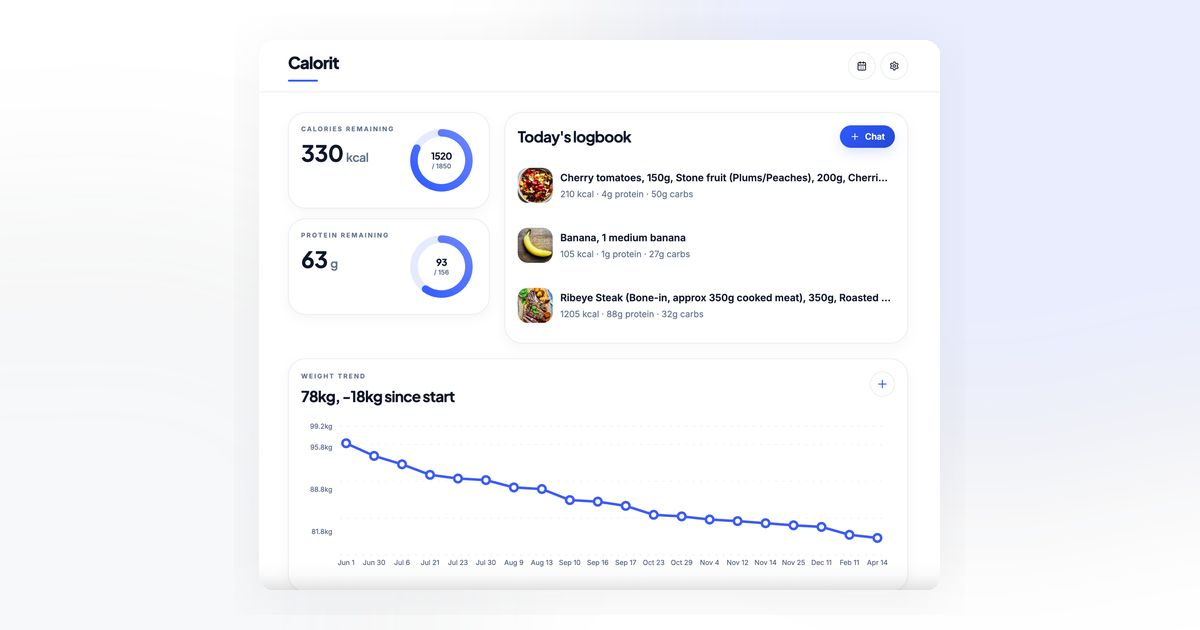
Within a minute, AppDeploy turned the conversation into a live URL. A few iterations later, we were logging meals by text and photo, saving recurring foods to a pantry, tracking protein and calories, and getting reminders on our own schedule. We called it Calorit.
The point was not to make another tracker. It was to make a personal tracker that adapts to your habits instead of forcing you into a generic subscription product.
That became the frame:
- Memory: it learns your recurring foods and preferences.
- Personalization: calories, protein, macros, reminders, and tone are all editable through chat.
- Ownership: no tracker subscription, no vendor-defined feature roadmap, no waiting for a product team.
The same prompt-deploy-iterate loop works in ChatGPT with AppDeploy too. This run happened in Claude.
This post is about how that conversation went, what got built, and why your version of Calorit can look nothing like ours.
Who this is for
This tutorial is for people who want a personal AI calorie or macro tracker without building backend infrastructure, setting up a database, wiring auth, or deploying from a command line. You describe the app in Claude or ChatGPT, and AppDeploy turns it into a live web app.
What we wanted from an AI nutrition tracker
Before typing anything, the requirements were short:
- Log meals by typing or by photo - no searching through a food database
- One screen that shows calories and protein remaining for today
- A weight trend chart that doesn’t require a separate app
- An AI that learns the foods we actually eat and stops asking the same clarifying questions
- Scheduled routines - reminders, daily resets, morning coaching - all tuned to our local clock, not the server’s
Just as important were the things we didn’t want: no streaks, no badges, no shame messages, no premium tier locked behind a paywall.
Step 1: Prompt Claude or ChatGPT
The first message to Claude was rough:
Build a calorie and macro tracker. I want to type or photograph what I ate
and have the app estimate calories, protein, carbs, and fat against a daily
target I set during onboarding.
Claude generated the app. AppDeploy deployed it. Within a minute we had a live URL. We opened it on a phone, signed in with Google, ran through a four-step onboarding, and logged a real lunch. It was missing things. That was fine - we stayed in the same chat and kept going.
This is chat-native deployment in practice: turning ideas described in an AI chat into a live app, without leaving the chat or needing to understand infrastructure. For the full platform workflow, see how AppDeploy works.
Step 2: Iterate on the app in chat
The first version was usable but bare. We didn’t switch to an issue tracker to plan what to add next. We just kept typing into the same chat.
“I keep eating the same Yogurt Pro - stop guessing the macros, let me save it.” The next deploy added a pantry. We snapped the nutrition label and the AI extracted the macros directly from the photo. From then on, “had Yogurt Pro after training” used the exact label numbers, not an estimate.
“Remember that I avoid whey.” The app grew a long-term memory of food preferences that the model reads back into the system prompt on every chat call. Suggestions stopped recommending the thing we won’t eat.
“Ping me at 21:00 if I haven’t logged anything, and again in the morning if yesterday ran heavy.” Two scheduled jobs got added, smart enough to fire at 21:00 and 08:00 in our local timezone. The cron runs every fifteen minutes server-side and only triggers per user when the local hour matches the target hour for that user’s profile timezone.
“The dashboard is too noisy. Strip it down to calories remaining and protein remaining.” Done in the next deploy.
Each of those was one chat turn. Each one redeployed automatically. The URL never changed.
After each deploy, AppDeploy ran QA against the live app, checking sign-in, onboarding, meal logging from text and photo, pantry product extraction from a label, and the scheduled coach messages.
The full AI nutrition tracker prompt
By the end of the session the app had everything we wanted. Here is the prompt that got us to our starting point - the app has kept evolving since, but this is a solid foundation to build from:
Build a personal AI calorie and macro tracking app called Calorit.
It should work like this:

- User signs in with Google. First time, run a four-step onboarding:
  current weight (kg), height (cm), birthday, sex, activity level,
  timezone, target weight, daily calorie deficit, protein target in
  g/kg, and optional food preferences in plain text.
  Calculate daily calorie target using Mifflin-St Jeor BMR x activity
  multiplier minus the deficit. Protein target = bodyweight x g/kg.

- Dashboard shows calories remaining, protein remaining, recent meal
  entries, and a weight trend chart. Let the user log weight directly
  from the chart.

- Chat is the main way to log food. The user types what they ate
  ("Yogurt Pro and an apple") or attaches a photo of the food
  or a nutrition label, or both. Extract the items, estimate calories,
  protein, carbs, fat, and write a short friendly analysis. If a saved
  pantry product matches by name, use its saved macros. The user should
  also be able to say things like "actually that was 300g not 200g" to
  update an entry, or "delete lunch" to remove one - ask for
  confirmation before deleting. If the message is unclear, ask a
  follow-up question instead of guessing. Each entry gets a meal type
  (breakfast, lunch, dinner, snack). Add quick-action buttons for
  "daily summary", "macro review", and "suggest a meal".

- History page with a calendar. Each day shows total calories, protein,
  carbs, and number of meals. Tapping a day opens the entries for that
  day with per-item macros.

- Settings page to edit the profile, manage a pantry of saved products
  (with macros - let the user photograph a nutrition label to fill them
  in), and toggle push notifications.

- Save food preferences and patterns the AI notices over time (e.g.
  "avoids whey", "prefers high-protein dinners") and read them back
  on every chat call so suggestions get better without the user
  repeating themselves.

- Evening notification at 21:00 in the user's local timezone: if
  nothing logged, nudge them; if logged, send a quick snapshot of
  the day. Morning notification at 08:00 only if yesterday went
  25%+ over target - one short supportive message, no shaming.

Light UI, blue accents, no streaks, no badges, no gamification.
You don’t have to start with this. Start simpler and iterate - that is how we did it.
What you need
- A ChatGPT or Claude subscription
- The AppDeploy app for ChatGPT or the AppDeploy connector for Claude
That’s it. No server, no hosting account, no Git, no third-party tracker subscription.
What the AI nutrition tracker includes
After deploying, sign in and run a short four-step onboarding: body composition, daily context, target calibration, and food preferences. After that, the app has four main views:
- Dashboard - calories and protein remaining at a glance, today’s recent entries, and a weight trend chart with a built-in widget for logging today’s weight directly from the graph.
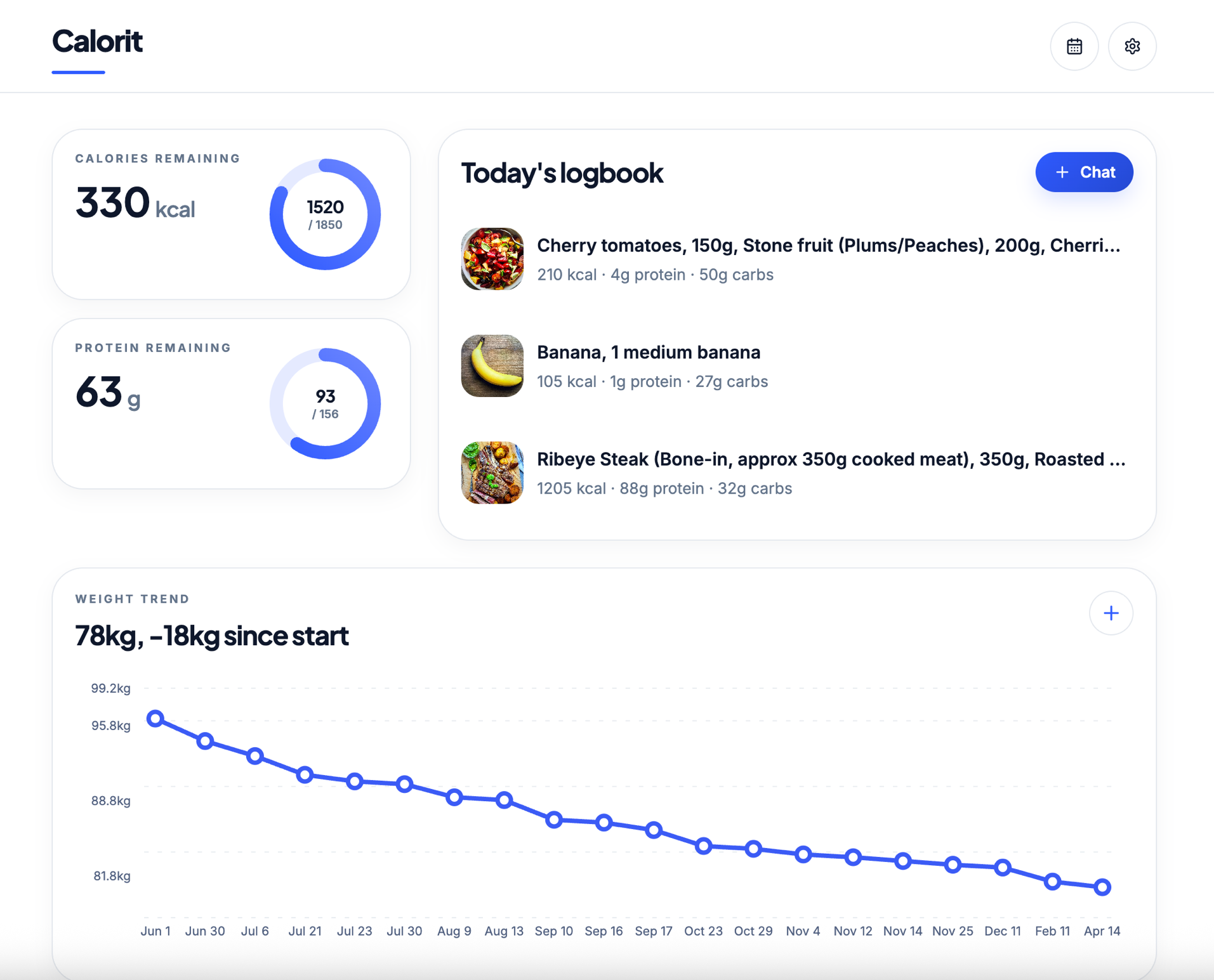
- Chat - the main logging interface. Log meals by text, photo, or both. The AI extracts macros and writes a short analysis. Entries can be added, updated, or deleted through natural conversation - the AI confirms before removing anything. Quick-action buttons for daily summary, macro review, and meal suggestions.
- History - a calendar view of past entries. Each day shows total calories, protein, carbs, and meal count. Tap a day to browse individual entries with their full macro breakdowns.
- Settings & Pantry - edit the profile, save common products with their macros by photographing the nutrition label, and toggle push notifications.
The evening check-in fires at 21:00 in your local timezone - today’s snapshot if you logged, a nudge if you didn’t. The morning coach only fires after a day that ran 25%+ over target - one short, supportive reset message, no streak to break.
Try the Calorit demo
You can explore a working version of the app here:
Sign in, run the four-step onboarding, then log a meal from the chat tab by typing what you ate or attaching a photo.
What AppDeploy handled
Calorit is not just a static page. It needs sign-in, user profiles, meal history, saved pantry products, image uploads, scheduled notifications, and AI calls.
AppDeploy handled the deployment layer: hosting, database, storage, auth, scheduled jobs, notifications, and live QA after each deploy. We stayed in the chat and kept changing the app.
Customize the tracker for your own goals
Because Calorit came out of a conversation, every part of it is up for grabs. There is no feature request to file and no maintainer to convince. You just say what you want next.
A few directions the same starter app could fork into:
- A vegetarian who tracks iron and B12. Add the micronutrients to the daily target, surface them on every meal extraction, flag low days.
- An endurance athlete on training blocks. On days tagged as a long run, raise the calorie target by 600 and the carb target by 80g.
- A parent cooking for the family. Add a “family meal” mode that takes one logged recipe and divides the macros across each person by bodyweight.
- Someone tracking carbs with a clinician’s guidance. Lead with carbs instead of calories, add optional glycemic-load estimates, and only share summaries with explicit consent.
- Someone who wants a calmer experience. Drop the AI analysis text, keep the numbers, shorten the morning message to one sentence.
Each of those is one prompt. None require touching code, opening a CLI, or convincing a vendor to add a feature. The customization is the point.
Frequently asked questions
Can I build an AI nutrition tracker without coding?
Yes. We typed in plain English the whole time. The AI wrote the code; AppDeploy deployed it. If you can describe what you want, you can build and keep changing an app like this.
What does AppDeploy do, exactly?
AppDeploy is the deployment layer that connects AI chat to a live, running application. You describe what you want in ChatGPT or Claude, the AI generates the code, and AppDeploy handles everything after that: bundling, hosting, database, auth, scheduled jobs, push notifications, and built-in AI. The result is a real deployed app at a live URL - not a preview, not a sandbox. You never leave the chat.
Is there a Calorit subscription or an app to install?
Neither. There is no Calorit company. It is an app you generate in your own chat, on your own AppDeploy account. You do not need a third-party tracker subscription. AppDeploy itself is free to connect.
Can I really keep changing it after the first deploy?
Yes. Every message in the same chat is another iteration - new field, removed screen, different coach tone, different unit system, an extra metric. AppDeploy redeploys automatically and the URL stays the same.
Can the tracker log meals from photos?
Yes. Calorit can log meals from text, food photos, nutrition-label photos, or a mix of them. For saved pantry products, it can reuse the nutrition-label values you reviewed and saved instead of estimating from scratch.
Can I use this as an AI calorie tracker?
Yes. Calorit can track calories, protein, macros, weight trends, and reminders. The same app can also be reshaped into a macro tracker, carb tracker, or meal-logging assistant.
How accurate are the calorie estimates?
For packaged foods saved to your pantry, Calorit uses the nutrition-label values you reviewed and saved instead of estimating from scratch. For freeform meals and photos, treat the numbers as useful estimates, not lab-grade measurements. The point is consistency over precision: you log every day instead of nothing, and the trend reveals more than perfect arithmetic ever would.
Is this medical advice?
No. Calorit is a personal tracking app, not medical advice, diagnosis, or treatment. Use it for general self-tracking. If you need clinical guidance, work with a qualified professional.
What data should I avoid putting into the app?
Avoid regulated health data, medical records, government IDs, payment card data, secrets, or anything you would not want stored by a personal web app. If your use case involves compliance obligations, design the app accordingly before collecting real user data.
What if I don’t want a nutrition tracker at all?
Then describe a different one. The same loop - chat, generate, deploy, iterate - works for whatever you want to build. See the gallery for other examples.
Build your own AI nutrition tracker
- Connect AppDeploy to ChatGPT or Claude
- Paste the prompt above into a new chat - or start simpler and iterate
- Sign in, run the four-step onboarding, log your first meal in the chat tab
The same pattern works for sleep tracking, habit logs, training journals, symptom diaries, and plenty of other personal data apps that today live in spreadsheets or half-used subscriptions.
The first evening check-in fires at 21:00 your time. You won’t have to remember.
Related reading: