What is Friends World Cup 2026 Prediction League?
Friends World Cup 2026 Prediction League is an AI-built app for friend groups who want to turn World Cup picks into a real tournament. One person creates the league, shares an invite link, and everyone competes for leaderboard bragging rights across the tournament.
Key features of Friends World Cup 2026 Prediction League
Users can make score predictions before kickoff, earn points for exact scores and correct results, view the live leaderboard, review match fixtures, follow group tables and bracket rounds, set reminders, and manage their profile settings.
How Friends World Cup 2026 Prediction League was built
The app brief uses AppDeploy auth, database, invites, notifications, and cron jobs with a World Cup API as the source of truth for teams, fixtures, standings, and results. The backend recalculates scores from fresh API data, enforces prediction locks, and keeps dashboard, fixtures, and leaderboard views synced.
Prompt used to build Friends World Cup 2026 Prediction League
@AppDeploy build a mobile-first app called Friends World Cup 2026 Prediction League.... It is a private friends-only World Cup 2026 prediction league. For fun only: no betting, money, gambling, odds, or wagers. Use this API: https://world-cup-api.appdeploy.ai Endpoints: /get/teams /get/groups /get/games /get/stadiums /get/flag/{teamId} Before implementing the UI, inspect representative payloads from all endpoints and create a backend adapter/normalizer. Do not let the frontend depend on raw upstream field names. Teams of bracket can be unknown/TBD if the group stage matches have not yet concluded. Games from the World Cup API include nested team wrapper objects, so display team names from game.home_team.team.name_en / game.away_team.team.name_en or fallback to game.home_team.label / game.away_team.label, not only from flat home_team.name_en fields. Don’t use “TBD” as a team name. For group standings, only count match results when the World Cup API field finished is exactly "TRUE"; when finished is "FALSE", treat the match as scheduled/upcoming and do not add points, even if score fields are present. Use flags from /get/flag/{teamId} Also create a visible non-transparent soccer-ball favicon asset and use it for: browser favicon loading/splash spinner The favicon must be visible on light and dark backgrounds. Time and timezone requirements: Frontend display, sorting, lock status, reminders, and prediction eligibility must all use kickoffUtc. The UI should display times in the user’s local browser timezone. Authentication is required. The welcome screen shows only the generated full-screen landing background image and a white 60px “SIGN IN” button at the bottom. After sign-in, send users directly to their league dashboard if they already belong to a league, otherwise directly to Create League. Users may belong to only one league. Use a mobile-first glassy UI: deep blue, red, and white; frosted cards, translucent panels, soft borders, backdrop blur, rounded cards, glassy top bar. Navigation: Dashboard is the main page. Dashboard top bar shows the league name, Fixtures icon, Leaderboard trophy icon, and Settings icon. Other pages show Back, page title, and no extra dashboard nav. Create League: Show a “League name” card with validated name input, 1-25 chars. Creating a league immediately opens the Dashboard. Invite sharing uses invite links. Join League: Invite links auto-capture the invite. If anonymous, show the welcome-style screen with a “JOIN THE LEAGUE” button that signs in and then joins automatically. If already signed in and not in a league, join automatically and go directly to Dashboard. If already a member, go directly to Dashboard. Dashboard: Show cards in this order: 1. “GROW YOUR LEAGUE” card with text “Invite your friends and predict your way to the top.”, Share button, and X dismiss button. 2. “NEVER MISS A PREDICTION” reminder card with Enable primary button and X dismiss button. 3. “UPCOMING MATCHES” section. Dismissed dashboard cards stay hidden locally. Upcoming match cards show teams on the left. If the user has a prediction, show predicted scores on the right and a pencil edit icon at top right; otherwise show a full-width primary “PREDICTION MISSING” button with red uppercase text. Games disappear from Dashboard 5 minutes before kickoff. Prediction Page: Title: “Make your prediction”. Show time and venue, then: Team 1 - 0 + vs Team 2 - 0 + Save prediction button. Add a secondary Rules button below Save. The score starts 0-0. Disable saving if teams are unknown/TBD, if final result exists, or within 5 minutes before kickoff. Enforce this on both client and backend API. After lock, users can see all league predictions. Show final score and per-user points when finished. Do not allow creator result override. Scoring: Exact score = 5 pts. Correct result only = 3 pts. Wrong/no prediction = 0 pts. Exact includes result. Leaderboard stores total points, correct count, exact count. Points should be recalculated whenever fresh API results are available, not only by cron. Also run a backend cron every 5 minutes near active match windows to sync results and send notifications. The API is the source of truth. Fixtures: Page title “Scores & Fixtures”. Tabs: GROUPS and BRACKET, uppercase. Groups view shows each group as a glassy card, one column desktop and mobile, max width 1200px. Each group table has only TEAM and PTS visually, no header row. Each row looks like the match cards: flag + team name on left, points on right, horizontal dividers. Sort teams by World Cup group tiebreakers: points, goal difference, goals scored, then head-to-head among tied teams. Add a thin clickable “Detailed statistics” header-line with a two-arrows expand icon attached to each group card. Detailed stats show cards for each team with flag, name, MP, W, D, L, GF, GA, GD, PTS. Fixture match cards: For scheduled games show teams left, countdown on first line right, date + exact time on second line right. For finished games show teams left and final scores right, no time. Bracket: Round headings like ROUND OF 32, QUARTERFINAL, FINAL should be glassy cards like group headings. Match cards should look like group fixture cards. TBD slots show their source, e.g. Winner Group A or Runner-up Group B. Do not allow predictions for unresolved/TBD games. Leaderboard: Leaderboard page should be a list of user cards, no table header. Each card: #1 🏆 Player name 14 Correct: 3 | Exact: 1 Use gold/silver/bronze cups for top 3. Settings: Profile card title “PROFILE”. Display name input, Save and Sign out secondary buttons. Show toast after saving. Show “GROW YOUR LEAGUE” share card after Profile with Share button. Show “REMINDERS” card. Show “LEAGUE” card, with text “To switch leagues, quit this one first.” and a secondary Quit league button. Quit league must use a confirmation popup. Global behavior: Use bottom-positioned toasts for success/errors with fixed positioning, auto-hide after max 5 seconds. Card titles are uppercase and consistent. Body text 18px. h1 24px. Primary/secondary buttons min-height 48px except welcome/sign-in buttons are 60px. Secondary buttons font size 20px where used as major actions. All cards need comfortable spacing so text/buttons never overlap. Notifications: Send one reminder notification one hour before each game if predictions are still open. If several games are at the same time, one notification is enough. When new points are awarded/recalculated, notify league users to check their points. Notification copy should be friendly and non-gambling. Backend: Store leagues, members, profiles, predictions, notification preferences, dismissed cards, and scoring history. Bootstrap should fetch latest World Cup API data, sync/recalculate prediction scores, then return fresh dashboard/leaderboard data. Cron should sync results and standings every 5 minutes during relevant match windows. Ensure API result reverts are handled by recalculating from current API state. Testing requirements: Create tests that verify the actual domain behavior, not just navigation. Include tests for: 1. Authenticated user can create a league. 2. Share button creates an invite without 500. 3. Invite link lets another user join. 4. Fixtures show real groups and team names retrieved from the World Cup api. 5. Flags images are shown. 6. Save prediction succeeds for an unlocked match.
Live Friends World Cup 2026 Prediction League demo
Open the live Friends World Cup 2026 Prediction League appSee more Lifestyle & Fun apps
GlobeEd
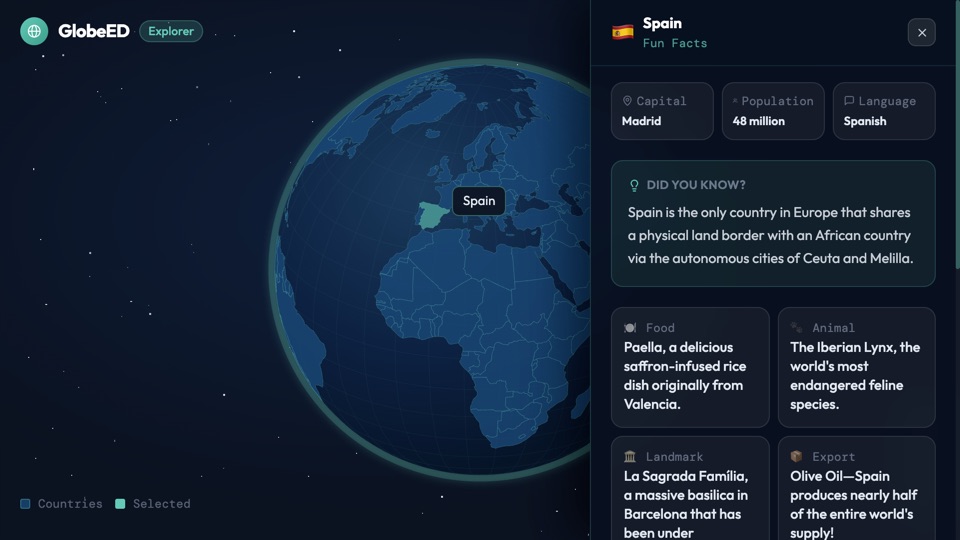
A spinning 3D globe where I can click any country and get fun AI-generated facts about its culture, food, history, language, and nature.
"AppDeploy a spinning 3D globe where I can click any country and get fun AI-generated facts about its culture, food, history, language, and nature."