
AppDeploy Security: How We Protect Your App and User Data
How AppDeploy security protects app and user data with tenant isolation, sandboxing, encryption, and scoped access.
Key takeaway: AppDeploy is a chat-native deployment platform: you tell your AI what to build, and AppDeploy makes it real. AppDeploy security is designed with multiple layers of protection so apps are isolated and data access is scoped, reducing the risk that any single control failure compromises your app.
Security at a Glance
| Layer | What it protects against |
|---|---|
| Tenant isolation | One app accessing another app’s data |
| Short-lived credentials | Stolen or leaked credentials being reused |
| Infrastructure policy enforcement | A bug accidentally exposing cross-app data |
| Sandboxed execution | Malicious backend code escaping to platform internals |
| Hashed API keys | Unauthorized callers invoking your app’s protected endpoints |
| Transport, encryption, and operational controls | Network interception, storage exposure, and unauthorized infrastructure access |
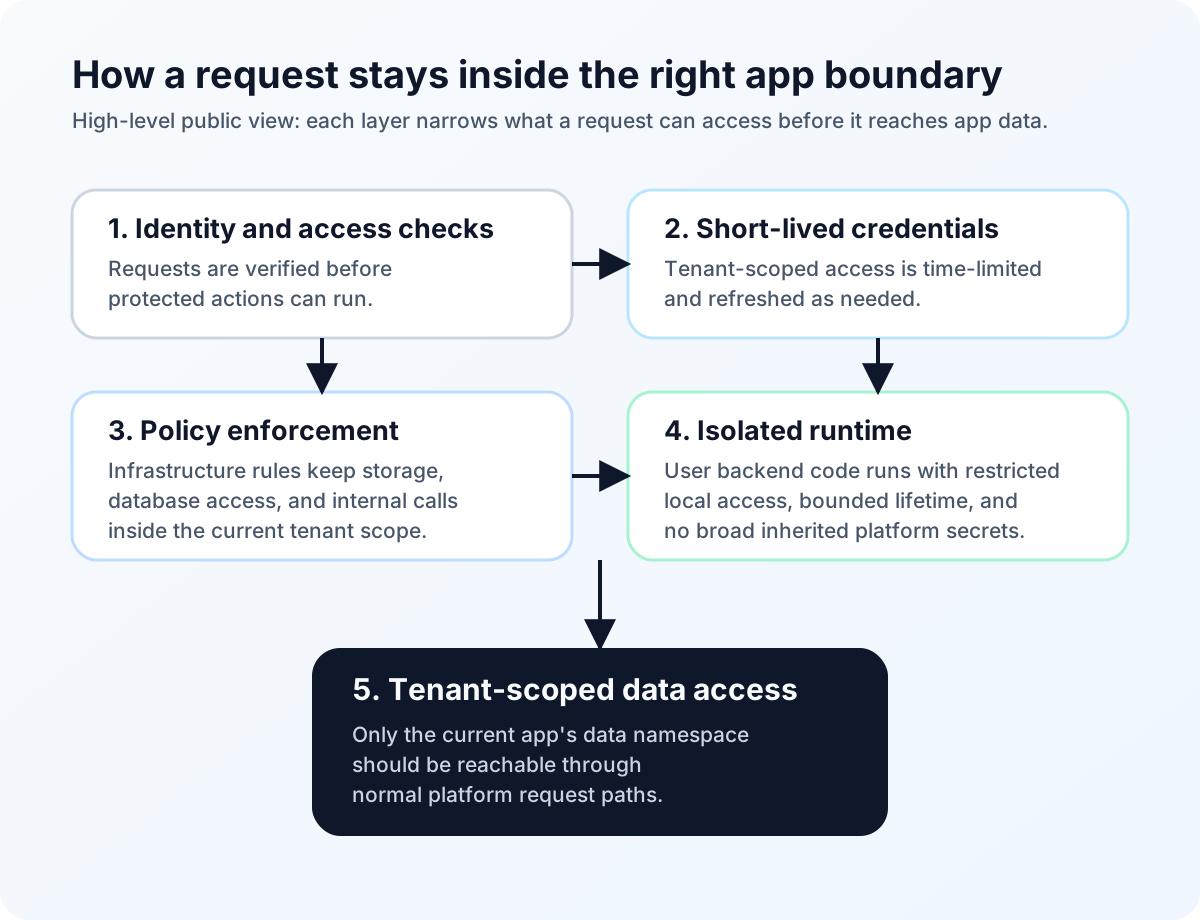
High-level request path: identity checks, short-lived credentials, policy enforcement, isolated execution, and tenant-scoped data access work together rather than relying on a single control.
Tenant Isolation Keeps App Data Separate
What we protect against: One app accessing another app’s data
Every app on AppDeploy lives in its own isolated namespace. Your files, database records, and internal communications are scoped to your app. Another app on the platform should not be able to reach your data through platform APIs because storage paths, database access, and internal communications are tenant-scoped. The system is designed to avoid shared cross-app data paths.
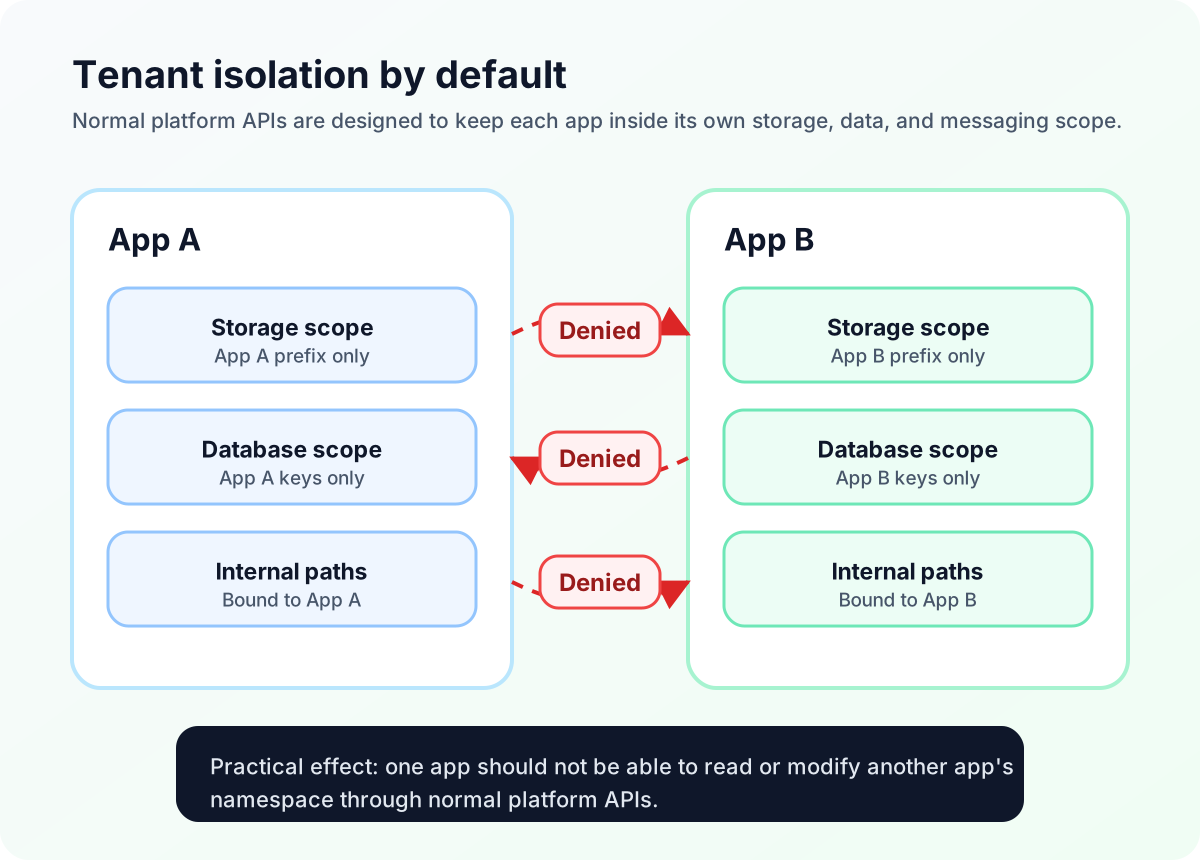
Tenant isolation by default: normal platform APIs are designed to stay inside each app’s own namespace.
Short-Lived Credentials for Tenant Data Access
What we protect against: Stolen or leaked credentials being reused
For tenant-scoped data access, AppDeploy uses short-lived credentials generated on the fly for a specific app and operation. If one of those credentials were ever intercepted, its lifetime and scope would be limited, reducing the blast radius compared with a reusable long-lived credential.
Infrastructure Policy Enforcement, Not Just Code Checks
What we protect against: A bug in our code accidentally exposing cross-app data
We do not rely solely on application logic to keep apps separated. The boundaries between tenants are also enforced at the infrastructure policy level. In practice, that means storage access, shared database access, and internal service paths are authorized only for the matching tenant scope. AppDeploy is designed so that even if there were a bug in application code, the underlying platform would still block many unauthorized cross-app access attempts. Defense in depth, not just defense in code.
Your Backend Code Runs in a Sandbox - Isolated Execution
What we protect against: Malicious backend code escaping to access platform internals
When your app’s backend code runs on AppDeploy, it executes in a constrained sandbox with restricted filesystem and runtime access. Workers use limited local permissions, allowlisted runtime inputs, and are designed not to inherit unrelated platform secrets. Deployed code cannot freely browse the host filesystem, cannot access platform-level secrets, and cannot outlive its allotted execution time. This helps contain buggy or malicious code within its own app boundary. The platform also includes an automatic kill switch that disables apps exhibiting abusive or anomalous behavior.
Protected Platform Access with Hashed API Keys
What we protect against: Unauthorized callers invoking your app’s protected endpoints
Protected platform operations used by your app’s backend are gated by API keys that are generated with strong randomness and stored only as cryptographic hashes - we never store the raw key. Presented keys are hashed and validated before protected operations run. Keys can be rotated, and older keys are invalidated on deployment, which reduces the reuse window for compromised credentials.
Transport Security, Encryption at Rest, and Operational Controls
What we protect against: Network interception, storage exposure, and unauthorized infrastructure access
- TLS in transit for communications with the service.
- Encryption at rest for stored data where supported by the underlying infrastructure.
- Least-privilege internal access controls and production access limited to authorized personnel.
- Operational logging, monitoring, and backup/recovery practices designed to investigate issues and restore availability.
For public details on data handling, retention, and responsibilities, see our Privacy Policy, Terms, and DPA.
Shared Responsibility
AppDeploy handles platform-level controls such as tenant isolation, scoped credentials, sandboxing, and infrastructure access controls. You are still responsible for your app’s own authentication, authorization, privacy notices, consent flows, and decisions about what data the app collects.
Deployments are live URLs with random, non-sequential identifiers that cannot be guessed or enumerated. However, anyone who has the link can access the app. If access should be restricted, you should add authentication and authorization inside the app. You can easily do so by asking your AI chat to add signup/login. The AppDeploy SDK and app templates already support that out of the box.
Do not include secrets, payment card data, government IDs, access credentials, or other restricted data in project files or messages. If your app needs to handle non-restricted end-user data, collect it through the running app at runtime and store only the minimum data needed there rather than embedding it in prompts or source files. Data your app stores on AppDeploy is encrypted while stored (aka: encrypted at rest).
Layered Security, Not a Single Wall
These protections are not alternatives - they are designed to work together on every request. Identity and access controls are checked, short-lived scoped credentials are issued where needed, code runs in isolation, and infrastructure-level policies enforce boundaries throughout. No single layer is the whole story; together they provide defense in depth for your app and your users’ data.
With AppDeploy, AI writes the code and AppDeploy deploys it - securely, with hosting, database, and backend services handled for you, without leaving the chat. For a broader product overview, see How AppDeploy works. For setup, platform support, and common edge cases, see the main FAQ.
FAQ
Is AppDeploy secure?
AppDeploy is designed with multiple layers of protection, including tenant isolation, short-lived credentials, infrastructure policy enforcement, sandboxed execution, and encrypted storage. No platform can reduce risk to zero, but the system is designed so that app data access stays scoped and no single control is the whole story.
Is deploying apps from ChatGPT or Claude secure?
It can be, if the deployment path uses scoped platform integrations and you avoid putting secrets or restricted data into prompts or project files. With AppDeploy, the deployed app is protected by the platform controls described above, but you should still be deliberate about what you share with any AI chat tool.
What stops one AppDeploy app from reading another app’s data?
AppDeploy combines tenant-scoped data paths with infrastructure policy enforcement. In practical terms, storage access, shared database access, and internal service paths are all designed to stay within the current app’s scope.
Is data encrypted in transit and at rest?
AppDeploy uses TLS in transit for communications with the service and encryption at rest for stored data where supported by the underlying infrastructure.
Can I make my apps deployed with AppDeploy private?
Yes. Deployment URLs use random, non-sequential identifiers that cannot be guessed or enumerated, so apps are not publicly discoverable. However, anyone with a link can access the app. If access should be restricted, ask your AI chat to add signup/login. The AppDeploy SDK and app templates already support that out of the box.
Can I deploy sensitive or regulated data?
In general, no. Keep project files and chat messages free of restricted data. If your app needs non-restricted end-user data, collect only the minimum it needs at runtime and store it there rather than in prompts or source files. For payments or other sensitive workflows, use specialized providers. You remain responsible for your app’s own compliance obligations.
How long are logs and backups retained?
Per AppDeploy’s public privacy terms, build logs are retained for up to 30 days, security and access logs for up to 90 days, and backups for up to 30 days after deletion on a rolling basis. See the Privacy Policy for current details.
Who handles end-user authentication and permissions?
AppDeploy handles platform-level isolation and infrastructure controls. You handle who can sign in, what each user can access, and how your app satisfies its own privacy and compliance requirements.
Related posts
- How AppDeploy works - The path from AI chat to a live deployed app.
- Testing AI-built apps - How QA and isolated test runs fit into the deployment flow.
- What chat-native deployment means - The category definition behind AppDeploy’s workflow.